< 사전 준비 >
다음과 같이 네트워크 드라이브를 생성합니다.

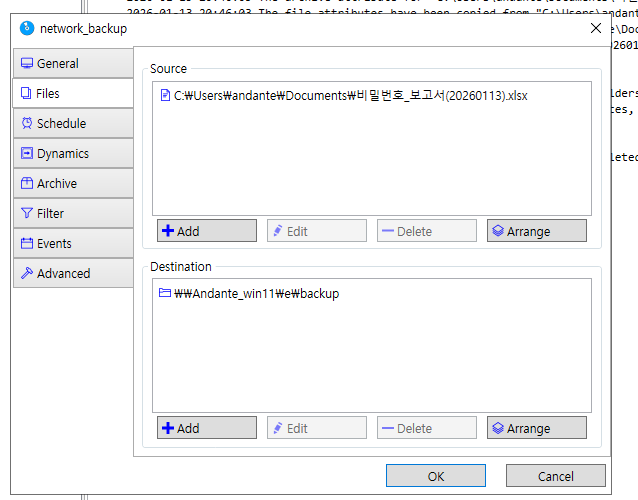
cobian reflector를 켜주고 작업을 생성합니다.task_name을 network_backup 이라 하시죠 Source 와 Destination에서 Destination을 설정합니다.

스케줄은 once으로 지정해주시고 데이트도 설정해주세요

네트워크 드라이브의 읽기와 쓰기 작업이 가능하게 허용해야합니다. 그리고 권한도
everyone으로 세팅하면 됩니다.
해당 스케줄을 클릭하면 속성값이 나오는데 다음과 같이 제대로 나오는지 확인합니다.

로그를 확인하면됩니다.
    2026-01-13 21:00:01 A backup has started...
    2026-01-13 21:00:01 Calculating the number of files. This could take a while...

     # 백업 시작
    2026-01-13 21:00:01 Backing up the task "network_backup"
    2026-01-13 21:00:01 Applying the parameters to the task "network_backup" (if any).
    2026-01-13 21:00:01 Requesting the creation of a Volume Shadow Copy image for the source...
    # vss 이미지 생성
    # 엑셀이 열려도 사용 가능
    2026-01-13 21:00:02 The Volume Shadow Copy image has been successfully created.
    2026-01-13 21:00:02 Starting the copy. The user running the task is: andante

    # 파일을 복사합니다.
    # 목저지에 저장이 되었습니다.
    2026-01-13 21:00:02 Copying the file "C:\Users\andante\Documents\비밀번호_보고서(20260113).xlsx" to "\\Andante_win11\e\backup"...
    2026-01-13 21:00:02 The archive attribute for "C:\Users\andante\Documents\비밀번호_보고서(20260113).xlsx" has been removed.
    2026-01-13 21:00:02 The file attributes have been copied from "C:\Users\andante\Documents\비밀번호_보고서(20260113).xlsx" to "\\Andante_win11\e\backup\비밀번호_보고서(20260113) 2026-01-13 21;00;02.xlsx".
    2026-01-13 21:00:02 The timestamps have been copied from "C:\Users\andante\Documents\비밀번호_보고서(20260113).xlsx" to "\\Andante_win11\e\backup\비밀번호_보고서(20260113) 2026-01-13 21;00;02.xlsx".
    2026-01-13 21:00:02 The file "C:\Users\andante\Documents\비밀번호_보고서(20260113).xlsx" has been successfully copied to "\\Andante_win11\e\backup\비밀번호_보고서(20260113) 2026-01-13 21;00;02.xlsx".

    # 네트워크 백업이 종료되었습니다.
    2026-01-13 21:00:02 ** Backup for the task "network_backup" has ended **
    2026-01-13 21:00:02 ** Processed files: 1. Backed up files: 1. Created folders: 0. Backup size: 9.35 KB. **
    2026-01-13 21:00:02 ** Number of errors: 0. Time elapsed: 0 hours, 0 minutes, 1 seconds. **

    # VSS 이미지를 삭제하였습니다..
    2026-01-13 21:00:02 Deleting the Volume Shadow Copy image...
    2026-01-13 21:00:02 The Volume Shadow Copy image has been successfully deleted.

    2026-01-13 21:00:03 The backup has ended without errors.
\\Andante_win11\e\backup\비밀번호_보고서(20260113) 2026-01-13 21;00;02.xlsx 로 저장된 것을 확인할 수 있습니다.

이상으로
Cobian reflector라는 백업 프로그램으로
네트워크 백업을 진행하였습니다.
차등 백업 진행하기
오늘 진행한 백업에서 작업으로 용량이 증가하였습니다.
백업을 진행하겠습니다.
[1] 차등 백업 경로를 만들어서 백업을 진행하겠습니다.
스케줄도 따로 지정하겠습니다.


[2] Differential backup ( 차등 백업 ) 을 의미합니다.
Enabled task가 yes인지 체크합니다.
백업 저장소가 올바른지 체크합니다.


[3] 백업 로그 분석
    2026-01-13 21:21:01 A backup has started...
    2026-01-13 21:21:01 Calculating the number of files. This could take a while...

     # New task 가 백업이 진행됩니다.
    2026-01-13 21:21:01 Backing up the task "New task"
    2026-01-13 21:21:01 Applying the parameters to the task "New task" (if any).

    # 해당 작업의 full 백업이 존재하지 않기 때문에 full 백업을 진행하였습니다.
    2026-01-13 21:21:01 Changing the backup type to full. Reason: first backup of the task.

    # vss 이미지가 생성됩니다.
    2026-01-13 21:21:01 Requesting the creation of a Volume Shadow Copy image for the source...
    2026-01-13 21:21:02 The Volume Shadow Copy image has been successfully created.
    2026-01-13 21:21:02 Starting the copy. The user running the task is: andante

    # 백업 저장소로 복사합니다.
    2026-01-13 21:21:02 Copying the file "C:\Users\andante\Documents\비밀번호_보고서(20260113).xlsx" to "\\Andante_win11\e\backup\차등 백업"...
    2026-01-13 21:21:02 The archive attribute for "C:\Users\andante\Documents\비밀번호_보고서(20260113).xlsx" has been removed.
    2026-01-13 21:21:02 The file attributes have been copied from "C:\Users\andante\Documents\비밀번호_보고서(20260113).xlsx" to "\\Andante_win11\e\backup\차등 백업\비밀번호_보고서(20260113) 2026-01-13 21;21;02.xlsx".
    2026-01-13 21:21:02 The timestamps have been copied from "C:\Users\andante\Documents\비밀번호_보고서(20260113).xlsx" to "\\Andante_win11\e\backup\차등 백업\비밀번호_보고서(20260113) 2026-01-13 21;21;02.xlsx".
    2026-01-13 21:21:02 The file "C:\Users\andante\Documents\비밀번호_보고서(20260113).xlsx" has been successfully copied to "\\Andante_win11\e\backup\차등 백업\비밀번호_보고서(20260113) 2026-01-13 21;21;02.xlsx".

     # 백업이 종료되었습니다.
    2026-01-13 21:21:02 ** Backup for the task "New task" has ended **
    2026-01-13 21:21:02 ** Processed files: 1. Backed up files: 1. Created folders: 0. Backup size: 10.45 KB. **
    2026-01-13 21:21:02 ** Number of errors: 0. Time elapsed: 0 hours, 0 minutes, 1 seconds. **

    2026-01-13 21:21:02 Deleting the Volume Shadow Copy image...
    2026-01-13 21:21:02 The Volume Shadow Copy image has been successfully deleted.

    2026-01-13 21:21:03 The backup has ended without errors.
[4] 백업경로에 파일이 제대로 복사된 것을 확인할 수 있습니다. 그리고, 원본지에 있는 크기와 백업 저장소에 크기가 동일한지 대조합니다. 백업지에 크기가 동일하지 않으면 데이터가 손실될 가능성이 존재하기 때문입니다.


[5] 해당 엑셀에서 작업이후 원본을 보호하기 위해 차등 백업을 다시 진행하겠습니다. 기존 잡은 full 백업을 최초 1회 실행하였기 때문에 차등 백업을 하면 됩니다. 그래서 backup type을 차등 백업으로 변경하였습니다. 시간은 지금으로 하겠습니다.
변경된 51 키로바이트가 저장된 것을 확인할 수 있겠습니다. 추가로 원본 엑셀 파일 용량과 대조해보니 서로 동일합니다.


차등 백업은 최초 Full 백업 이후 변경된 “파일 전체”를 저장한다.
cobian reflector 프로그램으로
차등 백업을 진행하였습니다.
'컴퓨터 > 백업' 카테고리의 다른 글
| 백업 프로그램 Cobian Reflector 사용 후기 (0) | 2026.01.10 |
|---|